

Why your Kirana store doesn't need a bulky desktop billing machine anymore
If you walk into a traditional Kirana store in India today, you will likely see one of two things at the checkout counter: a dusty, overflowing paper ledger notebook, or a massive, heat-generating Windows desktop PC hooked up to a tangle of wires, a heavy UPS battery, and a bulky dot-matrix or thermal printer.
For decades, Kirana store owners were told that to professionalize their business and track inventory properly, they had to invest heavily in "computerization." This meant spending ₹30,000 to ₹50,000 on hardware, paying an IT guy to set it up, and paying exorbitant Annual Maintenance Contract (AMC) fees to keep the outdated software running. But the era of the desktop billing machine is officially over. Today, all you need is a smartphone and a mobile POS app.
Reclaiming Your Counter Space
In a Kirana store, counter space is premium real estate. Every square inch covered by a monitor, keyboard, CPU tower, and UPS is space that cannot be used to display high-margin impulse items like chocolates, chewing gum, or batteries.
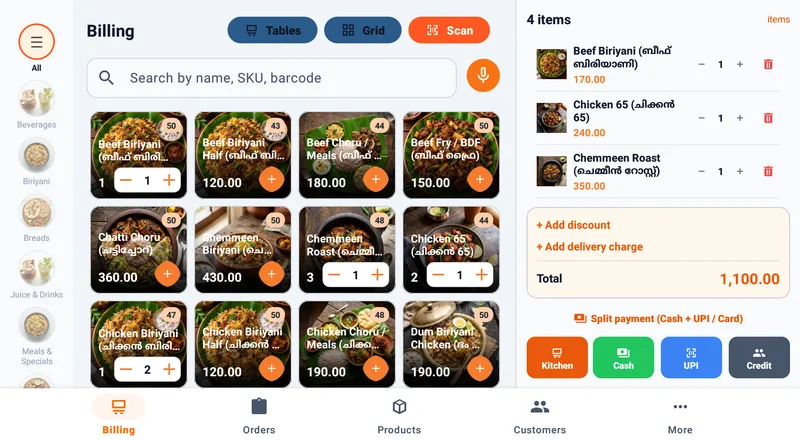
By switching to a mobile POS app like Dataflee POS, you condense an entire desktop computer's worth of functionality into a device that fits in the palm of your hand. Paired with a compact Bluetooth thermal printer that runs on its own internal battery, your entire billing setup takes up less space than a shoebox. You reclaim your counter space, making your store look cleaner, more modern, and more inviting to customers.
Immunity to Power Cuts
Power outages are a reality of doing business in many parts of India. When the electricity goes out, a desktop billing machine shuts down instantly unless you have invested in an expensive, heavy UPS battery system. Even then, you might only get 20 to 30 minutes of backup time. If the PC crashes in the middle of a transaction, you risk corrupting your database and losing your day's sales data.
A smartphone or tablet inherently runs on a battery. A Bluetooth thermal printer inherently runs on a battery. When you use a mobile POS setup, a power cut doesn't affect your checkout flow at all. Your lights might go out, but your billing counter remains 100% operational. You can continue scanning barcodes, generating digital bills, printing physical receipts, and accepting UPI payments for hours without plugging into a wall socket.
The Camera is Your Barcode Scanner
Traditional desktop setups require you to buy a dedicated USB barcode scanner, adding another wire and another ₹2,000 to your setup cost. Modern smartphones have incredibly powerful cameras with advanced image processing capabilities.
Dataflee POS leverages the camera on your Android device to act as a lightning-fast barcode scanner. It can instantly read 1D and 2D barcodes in various lighting conditions. For high-volume Kirana stores that prefer physical scanners, you can still easily pair a cheap wireless Bluetooth scanner to your phone, maintaining the completely wire-free environment.
Integrated Digital Khata and UPI
Kirana stores run on relationships and credit. A desktop billing software might help you print a receipt, but it rarely helps you manage the daily reality of the "khata" (customer ledger). Dataflee's mobile POS integrates a digital khata directly into the checkout flow. You can easily assign a bill to a customer's credit account and track their outstanding balance effortlessly, replacing the risky paper notebook entirely.
Furthermore, Dataflee generates a dynamic UPI QR code right on your device screen. The customer scans your phone with their GPay or PhonePe app, and the exact amount is pre-filled, eliminating manual entry errors and speeding up the checkout process.
The future of Kirana store billing is not a bigger, faster desktop PC. The future is mobile, wireless, and offline-capable. It's time to ditch the wires, the AMC fees, and the clutter. Download Dataflee POS today and transform your smartphone into the ultimate retail billing machine.